
6.2.0 (unreleased)#
Overview#
Included module versions
| Module | Version |
|---|
Accessibility improvements#
Skip nav link added#
A skip link has been added to the CMS to allow users to skip past the main navigation. This is primarily for users who use a screen reader or who navigate via the keyboard. The link is visually hidden until it receives focus by pressing the tab key.
Roving tabindex#
We've implemented roving tabindex for some UI regions within the CMS. These areas now act as a single tab stop, allowing users to navigate internal items with arrow keys and skip the entire section with a single tab. This aligns with standard ARIA practices for keyboard-accessible navigation.
Keyboard navigation for the site tree#
Keyboard navigation has been added for the site tree within the CMS, which now uses a roving tabindex. Users can now navigate, expand, and collapse tree nodes using arrow keys or the tab key. The "End" and "Home" keys move focus to the top and bottom page in the current nesting level, and the space bar expands and collapses nodes with children.
Keyboard navigation for "Files" admin section#
Keyboard navigation has been improved in the "Files" admin section. The files gallery and table views both now use a roving tabindex.
Users can now navigate between files and folders in the gallery view using arrow keys. The "End" and "Home" keys move focus to the first and last items in the current row, and holding control with those keys moves focus to the first and last items in the gallery respectively.
In the table view, the up and down arrow keys navigate between rows, with "Home" and "End" navigating to the top and bottom row respectively. The left and right arrow keys allow users to focus on individual cells in the table, which is useful for screen reader users.
In both views, pressing "Space" on a focused file or folder selects it. Pressing "Enter" on a focused file or folder is the same as clicking on it.
Various other attributes have also been added as appropriate so that screen reader users can navigate the asset admin.
Keyboard sorting for elemental blocks#
Elemental blocks can now be reordered using the keyboard in the CMS. There is now a keyboard focusable drag handle which can be activated using the "Space" or "Enter" keys, and sorted using the "Up" and "Down" arrow keys.
Improved keyboard navigation for tabs#
The CMS now supports keyboard navigation between tabs using the left and right arrow keys (go to the previous or next tab) and the Home and End keys (go to the first and last tab). When a user sets focus on a tab using the keyboard, the relevant tab panel is automatically displayed, removing the need to press Enter or Space to activate the tab.
Previously, keyboard navigation for tabs was inconsistent.
Campaign admin help menu improvements#
The help menu in campaign admin has been improved to make it easier to use for keyboard and screen reader users. The help icon is no longer shown when the help menu is open as it's not required as the close button is sufficient.
When the help menu is opened or closed, focus is moved to the relevant button so that keyboard users can easily find it.
Sortable header ARIA attributes#
Sortable headers on a grid field and asset-admin table view now include aria-sort attributes that indicate the current sort direction of the column.
Screen reader improvements for pagination#
Pagination controls in grid fields and asset-admin now have an improved experience for screen reader users, with the use of a nav tag with an aria-label attribute instead of a div, and a more descriptive title attribute on the pagination control showing the current page.
Changes to admin section HTML markup#
- The
.cms-menuelement tag has been changed from adivto anav. - Inside
.cms-panelelements, thea.toggle-collapseanda.toggle-expandlinks have been replaced with a singlebutton.cms-panel-toggle__buttonelement. - In the
silverstripe/linkfieldmodule, the.link-picker__deleteelement has been moved up a level so that it is now a child of.link-picker__linkand its tag has changed fromspantobutton. - The viewport meta tag no longer includes
maximum-scale=1.0, which prevented users from zooming in on mobile devices. It now includesinitial-scale=1.0instead. - The
.cms-containerelement has a new child.cms-container-skip-link-targetelement which contains the main content of the CMS, excluding the left-hand navigation. - The
a.campaign-info__closeelement in campaign admin has been changed tobutton.campaign-info__close. - The child elements of
.campaign-infohave been reordered. - The
ins.jstree-iconelements now havetabindex="0"so they can receive keyboard focus. - The site tree expander arrows have been changed from
<ins>to<span>to remove the incorrect semantic markup. - The "Go to previous record" and "Go to next record" buttons in a GridField detail form, when disabled, have changed from a
spanelement to anaelement with anaria-disabled="true"attribute. .grid-field__paginator__controlsand.paginator-footerelements have been changed from using adivtag to anavtag.
Changes to HTML markup elsewhere#
- In the
silverstripe/sharedraftcontentmodule, the markup for the message on the front-end has changed to use<details>and<summary>elements for the expand/collapse functionality and a<dl>list instead of a<ul>list.
Changes to usage of font-icon-* CSS classes#
The font-icon-* CSS classes are used to add icons through the CMS use a font to render normal characters as icons.
This is very useful for sighted users, but represents a problem for screen reader users, since screen readers want to read the icons like normal characters. For example, the font-icon-search icon uses the character "s", so screen readers will read out "s" whenever they encounter that icon.
In many places in the CMS markup we have added aria-hidden="true" to elements using font-icon-* CSS classes. Often this has required removing the CSS class from the element it was on, and adding it instead to a child <span> element. We have also changed some <i> elements into <span> elements for consistency.
The FormAction::setIcon() (and through inheritance GridField_FormAction::setIcon()) method is now used to define the font-icon-* class which will be added to the button's child <span> element.
Built-in grid field components implementing GridField_ActionMenuItem or GridField_ActionMenuLink now include the icon (without the font-icon- prefix) in the associative array returned from getExtraData(). Custom classes implementing these interfaces should do the same, so that the icon can be rendered in an accessible way.
If you were relying on an element having a CSS class that starts with font-icon- in the CMS, please review your code, as the CSS class you're looking for may be on a child element now.
If your own code uses a font-icon-* CSS class, we recommend adding aria-hidden="true" if the icon is purely decorative. If the icon is needed to present information that isn't presented with text, we recommend moving the icon into a child element, and adding an aria-label attribute to your parent element so screen readers have the same context as sighted users.
If your icon is being added to a FormAction or GridField_FormAction, we recommend using setIcon(). Pass the icon name without the font-icon- prefix.
If you are using the Modal component from react-strap inside the CMS, the close button icon may be missing. We recommend using the components/Modal/Modal component provided by silverstripe/admin instead, which wraps the react-strap modal but adds an accessible close button that matches the CMS styling. See using Silverstripe CMS react components for more details.
Functionality has also been added to allow swapping icons in an accessible way for alternating buttons (e.g. the save and publish buttons). See how to implement an alternating button (which has been updated) for details.
Improved contrast and focus states#
Contrast has been improved in various areas, including in the TinyMCE HTML editor. In some cases the contrast improvement has also included a change in the colour used.
Focus states across the CMS have also been standardised, using a blue outline for most elements. Where the blue outline was too dark, a white outline is now used.
These changes, especially the change to focus state styling, may result in styles in your custom components no longer matching the CMS styles. We recommend checking if your styles match the CMS styles after upgrading.
The new focus styling uses CSS variables, so you can easily change the values and use them to style your own components. The CSS variables in use are:
| CSS variable name | usage |
|---|---|
--focus-outline-width | Used with the first argument to the outline CSS property, or as the value for the outline-width CSS property. |
--focus-outline-style | Used with the second argument to the outline CSS property, or as the value for the outline-style CSS property. |
--focus-outline-color | Used with the third argument to the outline CSS property, or as the value for the outline-color CSS property. |
--focus-outline-color-inverted | Used when --focus-outline-color is too dark. Set --focus-outline-color: var(--focus-outline-color-inverted) or set the outline-color property directly. |
--focus-outline-offset | Used with the outline-offset CSS property. |
--focus-outline-offset-inset | Places the outline inside the element - used when there isn't enough space for an outline outside the element's bounds. Set --focus-outline-offset: var(--focus-outline-offset-inset) or set the outline-offset property directly. |
Features and enhancements#
Unsaved changes indicator#
A new unsaved changes indicator has been introduced to CMS edit forms. The indicator appears after a configurable amount of time after starting to edit a form, providing real-time visual alerts when changes have been made but not yet saved. This helps users keep track of their work and prevent accidental data loss by making unsaved modifications more apparent.

The indicator appears as a "notice" after a configurable initial period (defaulting to five minutes) and escalates to a more prominent "warning" after a second configurable interval (defaulting to ten minutes). This escalation ensures users are increasingly aware of long-standing unsaved changes.
See unsaved changes indicator instructions on how to configure the indicator.
PHP 8.5 support#
All supported modules have been updated to support PHP 8.5, this means that Silverstripe CMS 6.2.0 can be run on PHP 8.5 without issues.
Note that some third-party modules may not yet support PHP 8.5, so PHP deprecation warnings may still show for those if your PHP error reporting is set to report all deprecations.
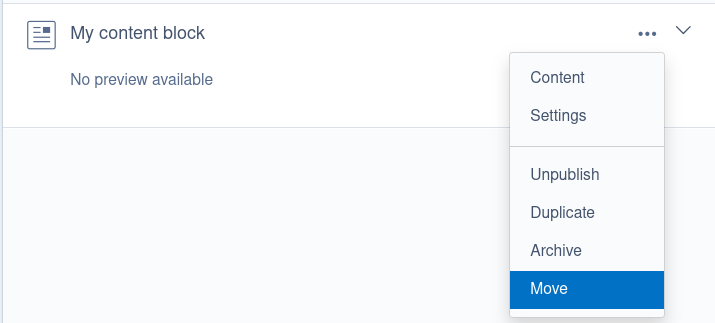
Move elemental blocks#
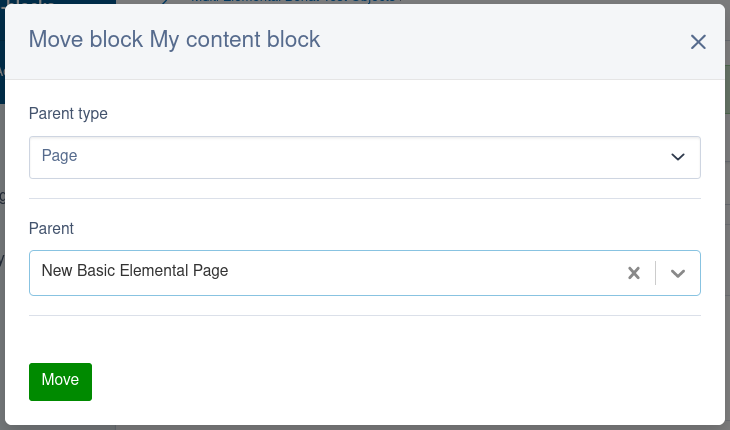
The dnadesign/silverstripe-elemental module now includes functionality that allows elemental blocks to be moved from one parent record to another. This includes moving blocks between different elemental areas on the same parent record.
The move form has been designed for flexibility and will automatically hide fields if there's only one option available. For example:
- If your selected parent record has only one elemental area relation, the dropdown for selecting an elemental area won't be displayed.
- If there are multiple elemental area relations, the dropdown will be available.
Automatic retries for queued jobs#
The symbiote/silverstripe-queuedjobs module now has the ability to automatically retry broken or paused jobs. By default no jobs will be retried, but you can easily enable this for all jobs by setting AbstractQueuedJob.retry_max_attempts to the maximum number of times you want to retry jobs.
Using the new configuration properties, you have a lot of control over the number of retries, how long each retry takes, etc. The example below makes each retry attempt take exponentially longer than the previous one. You can also randomise that delay to prevent clobbering your site and any external services your jobs might connect to.
Symbiote\QueuedJobs\Services\AbstractQueuedJob:
  # Exponential retry pattern
  # First retry attempt - Retry after 10 minutes
  # Second retry attempt - Retry after 20 minutes
  # Third retry attempt - Retry after 40 minutes
  # Fourth retry attempt - Retry after 80 minutes
  retry_max_attempts: 4
  retry_initial_delay: 600
  retry_falloff_multiplier: 2
  retry_falloff_multiplier_variance: 0
This new configuration can also be set for individual job classes, allowing for a lot of flexibility in how jobs are rerun - as well as several new configuration options on QueuedJobService which define how it manages queuing up automatic retry runs.
See the queued jobs troubleshooting guide for examples and more details.
Pass arbitrary attributes with requirements API#
When using Requirements_Backend as your requirements API backend (which is the default), you can now pass arbitrary attributes for JavaScript and CSS (<script> and <link> tags) using the $options argument in various methods.
This is supported through the Requirements_Backend::javascript(), Requirements_Backend::customScriptWithAttributes(),Requirements_Backend::combine_files(), and Requirements_Backend::css() methods - as well as the corresponding methods in the Requirements class.
The requirements API documentation has been updated to reflect these changes.
Note that the order of attributes in the <script> and <link> HTML elements injected by the Requirements API may change as a result of this.
If you have implemented a custom requirements backend, we recommend updating it to handle arbitrary attributes passed into the various $options parameters.
Filter archived records#
The "Archive" admin section now uses GridFieldFilterHeader and SearchContext to allow filtering archived records. The available filters are whatever is defined in searchable_fields for that class, with the below changes:
- For page records, the "Page status" filter field is removed in the archive admin filter form. That filter is used in the "Pages" section to filter by different versioned states, but isn't needed here.
- For all archived records a "Date Archived" filter is added to filter by a range of archive dates.
To facilitate this functionality, we've added a way to add extra searchable field configuration to a SearchContext instance through SearchContext::addAdditionalFieldSpecs() and SearchContext::setAdditionalFieldSpecs(). If you implement a custom SearchContext subclass, you should use SearchContext::getSearchFieldsSpec() instead of directly calling searchableFields().
Filter campaigns#
The "Campaigns" admin section which is added through silverstripe/campaign-admin now uses GridFieldFilterHeader and SearchContext to allow filtering campaigns.
You can filter by the name and description of the campaign, its status, and the publish date. This is all powered by searchable_fields configuration for the ChangeSet class, so you can customise the search fields by changing that configuration if you want to.
Good bye, base tag#
The <base> tag that Silverstripe CMS has long since used can cause issues, for example with server configuration, reverse proxies, and fragment links. It is not actually necessary for Silverstripe CMS to function. In this release, we have fixed the remaining bugs in the admin UI that necessitated the base tag, and have deprecated it.
The admin UI still includes the base tag by default, and will do so until a future major release. You can remove that with the following configuration:
SilverStripe\View\SSViewer:
  enable_base_tag: false
  rewrite_hash_links: false
We encourage everyone to remove the <% base_tag %> directive from their templates, and to make this configuration change.
NOTE
When SSViewer.enable_base_tag is set to false, the AdminRootController::admin_url() method now returns URLs of the form /admin/pages (or /mysite/admin/pages if you site runs in a subfolder) instead of admin/pages. If you call this method directly, it might pay to make sure your logic can handle this scenario (e.g. if doing string-matching on the value).
Rate-limited password strength checking no longer blocks password changes#
The password strength meter on the change password form fires AJAX requests on every keystroke to provide real-time feedback to users. With the default Security controller rate limit of 10 requests per minute, users found themselves blocked with HTTP 429 ("Too Many Requests") after typing just 10 characters, making the form unusable until the rate limit reset.
We've resolved this by adding URL pattern exclusion support to RateLimitMiddleware. This allows specific low-risk endpoints to bypass rate limiting entirely. The password strength endpoint is now excluded from rate limiting by default, since it only returns an entropy score and does not expose sensitive data or perform authentication-sensitive operations.
If you've configured custom rate limiting and need to exclude additional endpoints, you can do so by setting ExcludedURLPatterns in your middleware configuration:
SilverStripe\Core\Injector\Injector:
  SecurityRateLimitMiddleware:
    properties:
      ExcludedURLPatterns:
        - '#^path/to/endpoint$#'
        - '#^another/endpoint.*#'
Patterns are matched as regex against the request URL path and are validated at configuration time to catch invalid patterns early.
Other new features and enhancements#
-
A new
ChildFieldManagerinterface has been added to allow a parent form field to strictly control its children, but still allow setting/getting values for those fields let them handle AJAX requests. SeeChildFieldManagerdocs for more details. -
The
helpplugin is now added by default to allTinyMCEConfiginstances. If you were adding it manually, you can remove that custom code. If for some reason you don't want that plugin in one of your configs, you can useTinyMCEConfig::disablePlugins()to remove it - but be aware that it is extremely useful for screen reader users to keep this plugin installed. -
HTML::createTag()now supports value-less boolean attributes. For example if you passHTML::create('input', ['readonly' => true]), the result will be<input readonly>. Previously it would output as<input readonly="1">. -
The built-in session handlers
FileSessionHandler,CacheSessionHandler, andDatabaseSessionHandlerall now validate the session IDPHPSESSIDto ensure it matches a valid format, otherwise aRuntimeExceptionwill be thrown. -
Hierarchy::duplicateWithChildren()used to set new sort values for duplicated children - it now uses the sort values from the original records. -
Fields returned from
QueuedJobDescriptor::getCMSFields()have changed to improve the UX. If you were changing those fields (e.g. with a subclass or an extension implementingupdateCMSFields()) you may need to adjust your code to account for these changes. -
In a
GridField, if there are no actions in theGridField_ActionMenucomponent, the empty actions column (the column with thecol-ActionsCSS class) will be ommitted. -
Added the phone link option to the existing linking options in TinyMCE.
-
The
GridFieldAddNewInlineButtoncomponent now adds rows to the top of your gridfield instead of the bottom, making them easier to edit right away without scrolling. -
The text for various buttons in the CMS have changed from "Add {record}" to "Add new {record}". The text uses new localisation keys:
Old key New key SilverStripe\Forms\GridField\GridField.AddSilverStripe\Forms\GridField\GridField.AddNewAssetAdmin.ADD_FOLDER_BUTTONAssetAdmin.ADD_NEW_FOLDER_BUTTONCampaignAdmin.ADDCAMPAIGNCampaignAdmin.ADDNEWCAMPAIGNSilverStripe\UserForms.ADDEMAILRECIPIENTSilverStripe\UserForms.ADDNEWEMAILRECIPIENTSilverStripe\UserForms\Extension\UserFormFieldEditorExtension.ADD_FIELDSilverStripe\UserForms\Extension\UserFormFieldEditorExtension.ADD_NEW_FIELDSilverStripe\UserForms\Extension\UserFormFieldEditorExtension.ADD_FIELD_GROUPSilverStripe\UserForms\Extension\UserFormFieldEditorExtension.ADD_NEW_FIELD_GROUPSilverStripe\UserForms\Extension\UserFormFieldEditorExtension.ADD_PAGE_BREAKSilverStripe\UserForms\Extension\UserFormFieldEditorExtension.ADD_NEW_PAGE_BREAKSilverStripe\UserForms\Model\UserDefinedForm.ADDEMAILRECIPIENTSilverStripe\UserForms\Model\UserDefinedForm.ADDNEWEMAILRECIPIENTElementAddNewButton.ADD_BLOCKElementAddNewButton.ADD_NEW_BLOCKLinkField.ADD_LINKLinkField.ADD_NEW_LINK -
On a
MultiLinkField, you can now set the maximum number of links that can be set on that field. See the linkfield configuration documentation for details. -
The
DataObjectSchema::tableForField()method now uses a per-request in-memory cache to improve performance. If you adjustDataObjecttables/fields mid-request, you may need to callDataObject::getSchema()->reset()after making those adjustments. -
The
silverstripe/frameworknow allowssebastian/diff^6, ^7, or ^8 to support projects using PHPUnit 12 or 13 instead of PHPUnit 11 which core uses.
API changes#
Deprecated API#
The following API has been deprecated in this release, and will be removed or replaced in a future major release.
It's best practice to avoid using deprecated code where possible, but sometimes it's unavoidable. This API will all continue to be available at least until the next major release.
- The
DataList::getIDList()method has been deprecated. Use$list->sort(null)->column('ID')instead. - The
Relation::getIDList()method has been deprecated. Use$list->sort(null)->column('ID')instead. - The
EagerLoadedList::getIDList()method has been deprecated. Use$list->column('ID')instead. - The
UnsavedRelationList::getIDList()method has been deprecated. Use$list->column('ID')instead. - The
IconHOCreact component has been deprecated and will be removed in a future major release without a replacement. TheButtoncomponent'siconprop will still remain. - The
FieldList::dataFields()method has been deprecated. UseFieldList::getDataFields()instead. - Use of
<% base_tag %>in templates has been deprecated, as the base tag is not necessary for Silverstripe CMS to work.
Bug fixes#
This release includes a number of bug fixes to improve a broad range of areas. Check the change logs for full details of these fixes split by module. Thank you to the community members that helped contribute these fixes as part of the release!
DBField options array#
Some DBField implementations take an array of options in the constructor. This is notably used to set default values for DBString subclasses as documented in the default values documentation but can be used for other purposes as well.
When creating columns in the database, the options array wasn't being correctly passed through to the constructor, which made setting default values for string columns impossible among other things. This has been fixed.